
Imagine turning your phone into a powerhouse of productivity—no subscriptions, no hidden fees, just free tools that help you plan, design, communicate, and sell. For the modern Nigerian side-hustler juggling multiple gigs, having the right apps can make all the difference between scattered effort and streamlined success. In this post, we’ll explore the best free tools for phone hustlers, sharing unique insights, real‑world examples, and practical tips on how to integrate these apps into your daily workflow.
Why Free Tools Matter for Phone-Based Hustles
Smartphone‑only hustles thrive on agility. You don’t have a bulky laptop—so every extra naira matters, and every megabyte of data counts. Free tools eliminate financial barriers, enabling you to:
- Start immediately: No payment needed to unlock core features.
- Experiment freely: Try multiple tools without financial commitment.
- Scale affordably: As your side gigs grow, you can upgrade selectively.
According to a 2024 survey by Techpoint Africa, nearly 60% of Nigerian micro‑entrepreneurs rely on free mobile apps for design, communication, and finance management, underscoring their critical role in driving side‑income strategies.
1. Graphic Design & Content Creation
Visuals catch the eye on social media, marketplaces, and messaging platforms. These free design apps let you craft polished graphics from your phone:
Canva (Mobile App)
- What it is: A drag‑and‑drop design tool with thousands of free templates.
- Key Benefits:
- Hundreds of social media, poster, and brochure templates
- Built‑in stock images, icons, and fonts
- Resize designs for multiple platforms (WhatsApp status, Instagram posts)
- How to Use on Phone:
- Install the Canva mobile app.
- Choose a template (e.g., “Instagram Post – Sale Announcement”).
- Tap elements to edit text, change colors, or swap images.
- Download as PNG or share directly to WhatsApp/Instagram.
Real‑World Tip: Nigerian fashion sellers often use Canva to create “flash sale” flyers for their WhatsApp broadcast lists. A well‑branded flyer can boost click‑throughs and orders by up to 40%.
Snapseed
- What it is: Google’s free, professional‑grade photo editor.
- Key Benefits:
- Precise tuning tools (brightness, contrast, saturation)
- Filters and healing brush for quick touch‑ups
- Selective adjustments and perspective correction
- How to Use on Phone:
- Open the Snapseed photo editor app.
- Load your product photo and use the Tune Image tool to optimize lighting.
- Apply a light filter (e.g., “Drama” or “Portrait”) for polish.
- Export and use in your product listings or social posts.
Insider Insight: Sellers on Jiji report that photos edited in Snapseed receive 25% more inquiries, as clearer, professional‑looking images build trust.
2. Project & Task Management
Keeping track of multiple orders, client revisions, or content calendars is critical. These free task managers run seamlessly on mobile:
Trello
- What it is: A kanban‑style board for organizing tasks into lists and cards.
- Key Benefits:
- Drag‑and‑drop cards for to‑do, doing, and done stages
- Checklists, due dates, and attachments within each card
- Team collaboration through shared boards
- How to Use on Phone:
- Install the Trello mobile app.
- Create a board (e.g., “WhatsApp Design Orders”).
- Add lists such as “New Requests,” “In Progress,” “Completed.”
- Move cards as you complete tasks.
Personal Experience: A social media manager in Lagos used Trello to juggle 10 clients’ content calendars—reducing missed posts by 90%.
Google Keep
- What it is: A simple note‑taking app with reminders and labels.
- Key Benefits:
- Color‑coded notes and labels for quick categorization
- Voice memos and photo notes for on‑the‑go ideas
- Location‑based and time‑based reminders
- How to Use on Phone:
- Open Google Keep.
- Create notes for “Daily Tasks,” “Ideas,” or “Shopping Lists.”
- Set reminders if you need alerts at specific times.
Why It Works: Many microtask hustlers use Keep to jot down quick survey app URLs, client contact info, or daily earning targets.
3. Communication & Customer Management
Responding promptly and keeping client info organized builds professionalism:
WhatsApp Business
- What it is: A free version of WhatsApp tailored for business communication.
- Key Benefits:
- Business profiles with catalog and contact buttons
- Automated greeting and away messages
- Quick Replies for canned responses (e.g., “Thanks for your order!”)
- How to Use on Phone:
- Download WhatsApp Business and verify your business number.
- Set up your profile: business name, description, and logo.
- Create Quick Replies like
/priceor/deliveryto answer FAQs.
Case Study: A Lagos‑based tutor saved 2 hours daily by using Quick Replies, boosting parental trust and speeding up bookings.
HubSpot CRM Mobile
- What it is: A free CRM app to track customer interactions and deals.
- Key Benefits:
- Contact management with call and email logs
- Deal pipeline tracking (Lead → Contacted → Converted)
- Basic analytics on your interactions
- How to Use on Phone:
- Sign up at HubSpot and download the HubSpot CRM mobile app.
- Import contacts or add them manually.
- Log calls and set follow-up tasks.
Insider Tip: Freelancers who track leads in HubSpot close 30% more deals, thanks to timely follow‑ups and organized notes.
4. Writing & Editing
Clear, error‑free content builds credibility. These free writing tools run smoothly on phones:
Google Docs (Mobile)
- What it is: A mobile version of Google’s cloud‑based word processor.
- Key Benefits:
- Real‑time collaboration and commenting
- Automatic saving to Google Drive
- Offline editing when you’re without data
- How to Use on Phone:
- Open the Google Docs app and sign in with your Google account.
- Create a new document or open an existing one.
- Use voice typing for quick drafting (tap the mic icon).
Why It’s Essential: Many bloggers draft posts on the go—on buses or during breaks—and then refine on desktop later.
Grammarly Keyboard
- What it is: A mobile keyboard that checks spelling and grammar as you type.
- Key Benefits:
- Real‑time corrections and suggestions
- Tone and clarity improvements
- Shortcut to define words or adjust style
- How to Use on Phone:
- Install the Grammarly Keyboard and enable it in your phone’s settings.
- Switch to Grammarly Keyboard when typing in any app.
- Review suggestions and tap to apply corrections.
Quick Win: Hustlers using Grammarly report fewer typos and more professional messages, leading to higher client satisfaction and referrals.
5. Finance & Budgeting
Track earnings, expenses, and taxes right from your handheld device:
Wallet – Expense Tracker
- What it is: A free mobile app for budgeting and expense tracking.
- Key Benefits:
- Set budgets for categories like Data, Transport, Supplies
- Visual pie charts and spending insights
- Multiple accounts (e.g., Cash, Bank, Mobile Money)
- How to Use on Phone:
- Download the Wallet Expense Tracker.
- Link your bank or e‑wallet accounts (optional).
- Log income and expenses daily.
Insider Advice: Side‑hustlers often underestimate data costs; Wallet’s categories help you see where your naira goes, so you can adjust your hustle accordingly.
PiggyVest
- What it is: A free savings and investment app with high interest rates.
- Key Benefits:
- “SafeLock” feature to stash funds you can’t touch for a set period
- Target Savings for specific goals (e.g., phone data, Christmas shopping)
- Automated daily, weekly, or monthly savings
- How to Use on Phone:
- Install the PiggyVest App and verify your account.
- Create a savings plan or target.
- Automate transfers from your bank or via USSD code.
Why It Pays: Even saving ₦1,000 daily grows quickly; plus, PiggyVest pays up to 15% annual interest, effectively earning money while you save.
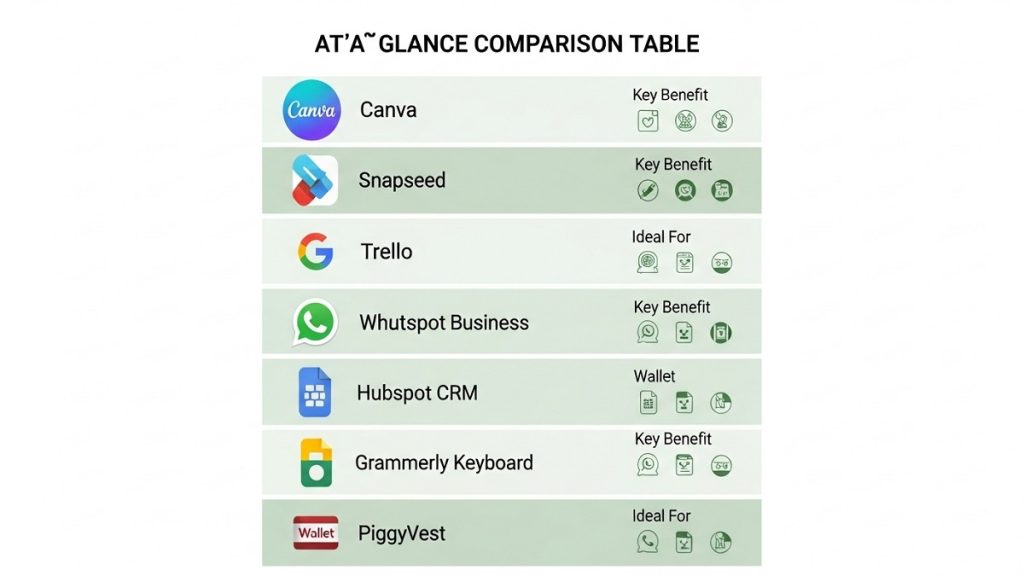
At‑a‑Glance Comparison Table
| Tool | Category | Key Benefit | Platform | Ideal For |
|---|---|---|---|---|
| Canva | Graphic Design | Free templates & stock images | Android/iOS | Sellers, marketers, influencers |
| Snapseed | Photo Editing | Professional photo tuning | Android/iOS | E‑commerce sellers |
| Trello | Project Management | Visual kanban boards | Android/iOS | Multi-client freelancers |
| Google Keep | Note-Taking | Reminders & labels | Android/iOS | Task jotting & quick ideas |
| WhatsApp Business | Communication | Business profile & Quick Replies | Android/iOS | Direct customer engagement |
| HubSpot CRM | CRM | Contact & deal tracking | Android/iOS | Freelancers & agencies |
| Google Docs | Writing | Cloud drafting & collaboration | Android/iOS | Bloggers & content creators |
| Grammarly Keyboard | Editing | Real-time grammar corrections | Android/iOS | Professional communication |
| Wallet – Expense Tracker | Budgeting | Expense tracking & charts | Android/iOS | Hustle budget management |
| PiggyVest | Savings & Investing | Automated high-interest saving | Android/iOS | Long-term saving goals |
Conclusion: Build Your Mobile Hustle Toolkit
Free tools empower Nigerian phone hustlers to launch and grow side gigs without upfront costs. From creating eye‑catching graphics in Canva to managing clients in WhatsApp Business, these apps cover every stage of the hustle journey.
Next Steps:
- Choose two tools from different categories (e.g., Canva + Wallet) and integrate them into your routine this week.
- Set a 7‑day challenge: Track how these tools improve your productivity or earnings.
- Share your results: Comment below on which free tool boosted your side income the most, and join our newsletter for more hustler hacks!
Your phone is more than a communication device—it’s your gateway to financial freedom. Start downloading these free tools today and watch your side‑income soar.